Thursday, 24 March 2016

Apple Watch Gets a Big Price Cut in India


Apple has slashed the retail price of the Apple Watch in India by Rs. 5,000. With the price slash, the cheapest variant - Apple Watch Sport (38mm) - is now available in the country at a price point of Rs. 25,900.
At a media conference in San Francisco earlier this week, Apple announced that it is making the Apple Watch less expensive to purchase. The company announced a $50 cut on the Sports model of the Apple Watch. In line with the announcement, Apple India told Gadgets 360 on Wednesday that it has knocked off Rs. 5,000 from the aforementioned model. The wearable comes in Sport, Watch, and Watch Edition variants. Do note that other variants of the Apple Watch aren't getting a price cut just yet.
Apple India told us that the price cut should be effective across retailers, though Gadgets 360 understands that it will take a few days before different retailers across the country start selling the Sports model at the revised price.
Apple launched the Apple Watch in India in November last year, with the Sport (38mm) variant costing Rs. 30,900, and the Sport (42mm) variant costing Rs. 35,900 At the event, the company also slashed the price of the iPad Air 2 by $100. The price revision, however, isn't currently live in India, Apple India told us.
The price revision makes the Apple Watch, the company's first wearable device even more enticing. For a first generation device, the Apple Watch feels very polished. Apple made its timepiece even more powerful with the watchOS 2 software update, bringing support for native apps, activation lock, and a number of other features and improvements. On Monday, alongside the iPhone SE launch, Apple also released watchOS 2.2, which brought features like the ability to pair multiple Apple Watches to a singleiPhone, the Nearby feature, an improved glance feature, as well as several performance improvements and bug fixes .

Wednesday, 23 March 2016

How to Link YouTube with your Adsense Account

Last time Vikarm informed you about YouTube partnership program which is a smart ways to make money from home. All you need to do is, create interesting videos, screencasts and upload it on Youtube. Once you have done it, you can use this link and enable monetisation of Youtube on your account.
Enable Youtube Monetization
I’m very sure many of you must have applied for the same to monetize your upload videos on YouTube. Here I’m sharing how you can link your YouTube account with your adsesne account.
Once YouTube will approve your application, you will get an Email to accept terms and link your adsense account. If you use Gmail login for YouTube, you can still link any other adsense account with your YouTube account.
This is the screenshot of first Email from YouTube after application is approved:
youtube-partnershipWhen you will click on Tutorial Completion and Contract, you will be taken to page where you have to read and click on next. After reading all the terms, you will be taken to Content licensing and VOD agreement page. Accept the policies and on the next page you will be taken to add Adsense login ID, last 5 digit of your phone number and Pin code.
link-google-adsense

Granting access to YouTube from Google Adsense account:

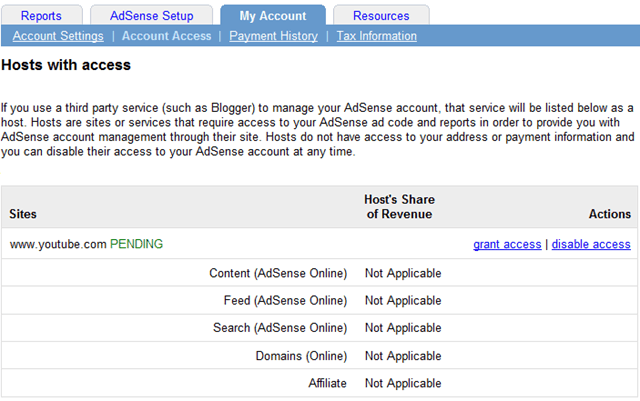
Login to your Google adsense account and you will see a notification saying, “You have requested to use AdSense on a partner website. In order to earn revenue on their site, you’ll need to grant them access to your AdSense account”.
adsense-account
Click on review account access and grant access to YouTube.
youtube-grant-access
Once you have done all the above mentioned steps, you will get an Email asking you to verify the access of YouTube to your adsense account. Once you approves it, it will take some time before Adsense ads will start displaying on your uploaded YouTube videos.
I hope this tutorial will help all those who are planning to monetize YouTube videos using Adsense. You can connect with me on YouTube @denharsh.
Do let us know if you are using Adsense for YouTube videos or not? Or are you planning to do some video screen cast for your readers in future?
article from shoutmeloud

A Complete Guide to Optimize Google Ads and Maximize your AdSense Earnings

I have been an Adsense Publisher for more than five years now. Google Adsense has been a primary revenue channel for me in the initial phase of my Blogging. AdSense has rewarded with few Premium benefits where am allowed to display more ads than an ordinary user with a dedicated support. Now Adsense has become a part of my earnings, but we don’t completely rely on Adsense anymore. My journey with AdSense has been very smooth, and I must mention that AdSense is best when it comes to Display Advertising.
The best thing about AdSense is, they come with a lot of new features based on the technology trends. As you know, Technology has been moving at a faster pace in the past two years. We have clearly seen a shift from Desktop to Mobile First to Mobile Only generation. With these things taken into consideration, AdSense has come up withResponsive Ads, Page Level Ads, Matched content and more in the past few months.
AdSense is an excellent revenue source for individual bloggers. I also know many small companies who rely on AdSense to run their businesses which of course, not recommended as AdSense income is dependent on several factors like CPC, CTR, Advertisers demand, etc. We have seen a lot of decline in CTR of Display ads as there was a shift from Desktop to Mobile technology.
In this entire blog post am sharing my 5 years of experience as a Google Adsense Publisher and things I have learned to boost my AdSense Revenue without violating any Google AdSense Terms of Service.
In case you missed I already wrote an article on “How much Revenue one can generate from Google Adsense” read it first.

What is AdSense Optimization?

Optimization is improving the business or product or service with the existing resources itself. So, when you talk about AdSense Optimization, it means optimizing your current traffic for better revenues.
Please note that Optimization is a never-ending process, and you have to keep on experimenting to find what works best at that particular point in time.

Mobile First Approach:

Before we get deep into the optimization part, I want to make it very clear that the number of visitors that we receive from Mobile has gone damn high. Slowly we are moving from Mobile first to mobile only scenario. So, you must make sure that your website/blog is well optimized for Mobile users. A responsive design is highly recommended in this case.

Watch the complete video tutorial on AdSense Optimization:

Key factors that you need to Tweak to improve AdSense Revenue are;

  1. Ads Placement.
  2. Using right Ad Formats.
  3. Displaying a maximum number of Ad Units.
Few more aspects which we will discuss in depth in this article.

Using Right Ad Formats:

When I say right ad formats, not all AdSense ad units perform best in all the placements. Generally, text links at the end of article perform better than a Banner Ad. So, you need to choose the right format based on your audience and Template of your blog/website.

Big is Better:

Bigger ad units like 300*600, 728*90, 160*600, 336*280 and 970*250 ads perform better as the CPC for bigger ad units will be high. In the desktop version of your website, it’s recommended to use bigger ad formats. Of course, you cannot use these ad formats in Mobile/Tablet Version.
best performing ad units on google adsense

300*250 is your go to ad unit:

If you are not sure about what kind of Ad unit to use then you can blindly go with 300*250 ad unit. As this is both Desktop and Mobile optimized with maximum fill rate.

Right Ad Placement:

This is the most crucial area and its a never ending process. We also have a Tab called experiments on Google AdSense Dashboard in My Ads section. You can head over to experiments and split test ad units and check what’s performing the best in a particular placement.

Above the fold.

Generally, above the fold is the area that loads first when you open a web page. And this is where the maximum exposure of a visitor goes into. Placing more ads above the fold in right ad formats can boost your income multiple folds.
  • Do not waste the above the fold space, make sure the above the fold section is occupied with content blended with right ad formats.
  • Do not push the ads and content below the fold by displaying the menu bar or a Big size logo.
  • It’s recommended to use 300*250 or 300*200 ad units above the fold.

Place Ads within the Content:

blend ads within the content
Some people place more ads on right sidebar or footer which is not at all recommended. Visitors come to your blog to read your content, and that’s the place where you should place a maximum number of Ads for high CTR.
  • An ad unit below the title, one random ad within the post and one ad unit at the end of the article would be an ideal approach. But make sure that the content is lengthy enough to place these many ads.
  • If your content is short or having less number of words, then it would look clumsy with a lot of ads which is not at all recommended.

Top Ad Recommendation:

Placing a Responsive ad unit would be fine in this case, but a responsive ad units automatically fit according to screen resolution, and we do not have any control over this ad unit. So, I would recommend to use a custom-sized ad unit and make it responsive.
Using this method you can display a bigger ad on Desktop version and a 300*250 or 300*200 ad unit on Mobile version as well. Currently, this is the best-performing Ad Unit for me on all my blogs.

Random Ad and Bottom Ad:

Random Ad, go with the same approach as the Top Ad. In the case of Bottom Ad, you can even follow the same approach as the Top and Random ads, along with it you can also use Text Link ads at the bottom of the post, and it performs better than Banner ads at the end of the article.
But however you have to split test yourself and find out what’s working best for you.
In my case, I use text link ads on AllTechBuzz (check this post) and on my other website AllIndiaroundup I use a banner ad at the bottom and text links in the middle of the post.

F-Pattern and Heat-Map:

As per few case studies, it’s known that that F-Pattern placement can yield high CTR ad the visitors look for the content in these patterns most of the cases. You can additionally use a premium tool called CrazyEgg to understand what your visitors are looking at.
f_reading_pattern_eyetracking

Color Combinations:

Most of the publishers go with the default style but if you are using a light background or dark background trying contrast color scheme can help you in improving the CTR.

DFP and Ad Exchange:

Generally, AdSense allows only 3 Banner ads and 3 Text link ads per page for all the publishers. Of course, few publishers are allowed to use more than 3 Banner ads per page with an exclusive agreement. However, it’s not that easy to fall into that category as it requires very high traffic and consistent earnings.
Other publishers can either use DFP to show more than 3 ads, i.e., 2 more. But, DFP must be used when you are using third party ads. Just using DFP for the sake of using 2 more ads would be a violation and could lead to Adsense Ban – However chances are very less, and Google hasn’t confirmed anything regarding this.
Ad Exchange : There are few certified Adsense partners who tie up with Adsense and are allowed to display 5 ads per page. Additionally, Ad exchange has RTB system which will yield you high CPC and CPM ads. You can join a reputed network who take a flat 8-15% commission of your Adsense Income generated from their ad units.

EZOIC:

This is one of the best platforms that I have been working on in the past few months, and they have improved a lot of features that help in not only boosting your AdSense revenue but they will directly show the best possible ad unit on your blog from the hundreds of ad networks they are working with.
I will be writing a separate article on EZOIC explaining its features. But, EZOIC is a must try platform to boost your revenue of your blog.
  • The best thing about EZOIC is you can start using 5 ads from the day 1.
  • Am still experimenting different features available on EZOIC. I have a strong feeling that EZOIC can easily boost your income by 200%.
  • Get started with EZOIC now.

Final Words:

If you follow all the above-listed tips, then you should definitely see a spike in your earnings. Additionally, if you are looking forward to a review from an expertise, you can try our consultancy, and we will guide you the right approach to boost your income without wasting much time.
You can watch the complete video on YouTube and check the PPT on SlideShare.
article from alltechbuzz

11Cs to Fulfill Your Startup Dreams – Golden Tips for Newbies

Some hear about startups being bought for millions by big companies, and hatch plans to start their own internet business.
Others nurture online business ideas that they think will shake the web for long-time before taking the leap of entrepreneurship. While there is nothing bad in dreaming big, it is important to keep the realities of starting and running an online business in mind.
When it comes to starting a web business, there are hundreds of details to be masteredbut let’s just focus on 11Cs under the most critical phases of starting an e-venture. And it only makes sense to begin where it really begins.

Initial research and planning

‘Little can be accomplished without planning’. The statement holds true for almost everything challenging in life. Whether you want to start an online store or something completely unique, you need a blueprint, a roadmap or whatever you want to call it. And in order to do that, you need:
Clarity of ideas
1) Clarity – The process of planning cannot begin unless you are crystal clear about your needs. Want to blog for a living? Answer these questions first:
  • What kind of blog I’m capable of running?
  • What is the competition out there?
  • Are there unanswered questions that my blog can address?
Answering such questions will help you learn if you are ready to start and run an online business or need to busy yourself with groundwork.
2) Courage – Every idea is brilliant while it exists in your head. Finding time to put your thoughts on paper, discussing them with people, and taking concrete steps to materialize your ‘great idea’ are the real challenges. And doing all this requires real courage.
Courage motivation
This is a part of planning because this is where it all begins. If you cannot muster the guts to start working on that glorious online business idea, we are sorry. It can do nothing more than impress your drunk friends.
Groundwork
Okay. You are done with the initial planning, and are sure that this is the online business idea that you want to bet on. Next is the task of doing the work that people won’t see but will become the backbone of your venture.
For multivendor e-commerce stores, this means getting merchants on board. For food ordering and delivery startups, this means joining hands with local restaurants. Got the idea?
Now to go through this phase smoothly, two Cs are most crucial, and they are:
3) Collaboration – Of course you cannot do it all on your own. You need people. People that are:
  • Capable
  • Trustworthy
  • Skilled
  • Righteous
Collaberation
Without collaborating with such people, it would be really difficult to get your venture off the ground. This bunch can be your friends or people you pay to do the work. Mostly it’s the prior.
4) Conviction – Starting something online just because it seems a good way to make easy money will never lead you far. To create an online business that survives the tests of time, you need to believe in your idea. And this ought to be true of your team as well.
Idea motivation
Strong belief in your internet business will help you and your team in completing the tiring groundwork.
NOTE: Even if your amazing online business doesn’t require offline struggle, you still need a team that believes in your idea and is willing to go the extra mile, online.
Site setup
Good news, it’s time to build your website, app or software. Bad news, it will be exhausting if you don’t know how to code. There is no dearth of amazing web businesses that never scaled because they failed to connect with target audience or came out with poor features.
Let’s straight get to the Cs that will play a dominant role in making you succeed with the Setup phase:
5) Capital: Already dreaming about making loads of money and raising millions in VC funding? Stop right there. Before that, your unique idea needs financial nurturing. The capital will be mostly spent on hiring:
  • Designers
  • Developers
  • UX and SEO experts
  • Infrastructure (servers etc.)
If you already have a team that has great design and development talent, then, the investment will be less. But don’t think you can go ahead and build something awesome without some dough.
6) Concentration: During the development phase, it usually happens that the focus strays away from the primary idea, making the end product something that doesn’t fit in the initial vision. This is why founders ought to stay true to the blueprints finalized during planning and development phase.
Here are some points that will help you with the task:
  • Explain your vision to your team in detail in the very beginning.
  • Write down your goals and objectives and paste it somewhere everyone can see.
This however doesn’t mean you have to ignore suggestions from the team members. Embrace ideas that align with your product philosophy.

Marketing (Yeah! you need to tell people)

Congratulations! You have a website just the way you wanted. Okay, somewhat like you wanted but it will not generate traffic on its own. You need to work for the visitors and it is not going to be easy since you spent a big amount of your savings in developing the site and don’t have handful of millions in funding. So, don’t even think of TV ads.
Marketing your product
Below Cs will come handy to make your online business trend on internet:
7) Creativity: Even offline businesses are trying to grab eyeballs online. In such a melee, how will you make your new venture stand out? We think creativity can drive your brand message across in the choking internet advertising scene. All you need to do is:
  • Plan memorable ad banners
  • Create engaging explainer videos
  • Run interactive video ads
  • Engage your audience with insightful conversations
Okay, this is easily said than done but this is also exactly what you need to do if you are thinking about paid marketing. Check out this post if free marketing is on your mind.
8) Commitment: No matter how passionate you are, you will get tired of ‘selling’ on internet at some point of time. It is inevitable unless you taste the fruits of success quite early.
Don’t stop your efforts when everything seems a lost cause. Stay committed to your marketing practices, and work relentlessly to:
  • Get your venture featured on relevant blogs and news sites
  • Communicate with relevant audience on platforms like Quora
  • Speak about your online business offline as well
Stay true to your marketing goals and our next section will follow.

Funding! (Do you wanna accelerate?)

How fast you wanna accelerate
VC or angel funding is like getting paid millions to raise your own kid. While some startups and online businesses continue to grow without funding, it is nice to know that there is truckload of cash in the bank to undertake aggressive expansion. But dollars will not come walking to your door. You will have to earn them, and here are 2 helpful Cs for that:
9) Coaching: Even if you have the most brilliant online business idea in the world, it still needs to make sense to angel investors and venture capitalists.
Doesn’t sound difficult?
What if you only have a couple of minutes to explain:
This is why you need someone that has firsthand experience in presenting ideas to reluctant people in suits. Long story short, get a mentor.
10) Consistency: Time to refer to top dating rule! ‘Be prepared to be rejected, multiple times’. Your pitch for raising money will find no takers so many times that you will lost count. This is why you need to practice ‘not giving up’.
Rejection Seth Godin
Keep approaching VCs and connecting with investors to find the one that will be ready to bet on your dream online venture. This however will only work if you do as Paul Graham (founder of Y Combinator). He says:
“Convince yourself that your startup is worth investing in, and then when you explain this to investors they’ll believe you”
And let’s not forget the most important point.
11) Customers/clients: Seems kind of obvious, right? Yes but still worth mentioning. Your website, mobile app or software needs users, and their number needs to grow as the months pass by.

Subscribe on Youtube

 
While you need to think about this from the planning and research phase itself, don’t forget about the users while including new features. Answering such questions will also help:
  • Will the new features add value to user experience?
  • What matters the most to target audience?
  • How to counter clones and competitors?

Besides Cs

There are 700-paged ebooks and rather small videos out there titled ‘starting an online business for dummies’ or something similar of sorts. And let’s not get started on the startup literature out there available for free and few pennies.
To put simply, there is overwhelming knowledge to help you gain perspective on starting and running an online business. But remember, the best way of learning about anything is by doing. So, get out there and get your hands and mind dirty.
article taken from shoutmeloud

Google Tax: What Every Indian Blogger & StartUp Should Know

Have you ever heard about the “Google Tax” or Google, Amazon or Facebook Tax”. As per the recent Union Budget, our finance minister Mr Arun Jaitley had talked about introducing a tax on an income as accrued to a foreign e-commerce company out of India.

What is Google, Amazon or Facebook Tax?

As per the recent announcement, a person who makes a payment to a non-resident technology company need to withhold 6% Tax on the gross amount being paid as an equalization levy (More on this with an example is given in the further section of this post).
The said rule applies to a company who does not have a permanent establishment in India and only in case wherein the total payment being made exceeds Rs. 1 lakh for a particular financial year for availing certain specified services.
What are the services which come under this rule?
Specified services include the online advertisement or any other services for using digital advertising space and this list may be expanded soon. On an e-commerce portal, there are many services which are provided and given a fact that the proposed section is wide enough to introduce many more services under its ambit.
What is the reason behind introducing this tax?
This tax is popularly known as Google Tax  or ‘Google, Amazon and Facebook tax’ in UK & Spain aiming at levying the tax on the technology companies which makes money via online advertisements and their revenue is mostly routed to a tax haven country. So, in order to bring those companies under tax radar in India, this tax is introduced here. With the introduction of this tax; India has also joined the list of other OECD and European countries where the similar tax has already been introduced.

How Google Tax will impact you or your Startup?

At the first glance, you may think that it may not have any impact on you but if you are one of those business owners mainly running any SMEs or an online start-up and wanting to use Facebook or Google for your advertising & marketing promotions then you will be impacted with this Google tax. Let us take an example; assume that you run a company and want to pay Rs. 5 lakhs to a foreign company for using their online advertisements services like the way most of the people use Google ads or Facebook ads.
Now with the new tax in place, you need to withhold 6% of Rs. 5 lakh i.e. Rs. 30,000/- and need to pay the balance of Rs. 4,70,000/- only. Google tax of Rs. 30,000/- needs to be paid to the government.
Now this needs to be seen that whether foreign company will bear the loss or will they increase their price by grossing up this tax amount, if that is going to happen then the loss will be borne by the Indian business owner.
It means that his overall billing will shoot up by an additional 6% Google tax and in turn he need to pay Rs. 5 lakh plus taxes i.e. 6% tax (so in all Rs. 5,30,000/-). So it remains to be seen that who will bear the actual loss, a foreign online advertising company by simply accepting lower margins or they may simply add a higher advertising rate to takes into account additional google tax?
What in case Indian business owner/company fails to deduct this levy/tax?
The Budget had proposed that any Indian business owner or company who do not deduct this google tax or equalisation levy and do not deposit with the government then the said expenses will be disallowed in calculating their taxable profits. It means that their taxable income will go up and thereby tax liability.
Note: It will not harm your Adsense earning. Because this tax applies to advertisers not publishers.
1. If you Publish ads on your site with adsense, this tax doesn’t apply because you are a publisher.
2. If you are an advertiser and wants to publish your company’s advertisement then this tax will be applicable to you. This is like TDS (Tax Deducted at source) and not an additional levy on you, it means that you have to deduct 6% from the total payment you will be making to Google or Facebook towards their fees. You need to pay 94% of the total payable bill to Google and remaining 6% needs to be deposited with the government.
Feel free to let me know if you have any question about Google tax? In the coming days I will share more insight on the same. If you need help with Tax calculation for your online income

Todoist for Android lets you build tasks using natural language

                   More importantly, you can now identify projects with emoji.


Task management app Todoist may require a $29 annual subscription for you to get the most out of the app, but at least the frequent pace ofupgrades and feature additions makes it feel like you're getting your money's worth. Today, Android users are getting some love with the launch of Todoist 9, an update that brings a handful of smart features as well as some design tweaks to make the app feel even more at home on Google's mobile OS.
Perhaps the most clever trick that Todoist for Android now features is called Intelligent Input. Todoist already let you type using natural language to set to-do items and reminders (For example: typing "send in rent check on the 1st of every month at 10AM" would automatically add a recurring to-do item, complete with reminder). But Intelligent Input takes it a step farther, letting you add things directly to project or adding members to a to-do item just by typing. Adding a # symbol lets you put in whatever project you'd like to assign the item to, and typing + with another Todoist user's name will add them to the task -- perfect if you use the app along with family members or roommates to get things done.
The update also adds support for Bluetooth keyboards. We're not sure why they didn't work before, but if you use an Android tablet plus a keyboard to get work done -- something that should become more commonplace withAndroid N's new multitasking features -- you'll appreciate this change. Todoist has also improved syncing, with notifications read and dismissed on other platforms syncing back to the Android app. Syncing tasks in general is said to be four times faster with this update, something Todoist claims will help reduce the app's drain on your phone's battery.
Todoist made a few other UI tweaks which you can check out in the screenshots below; it's nothing radical, but it does help make the app easier to navigate than before. Oh, and one last change is pretty radical: you can now include emoji when you're naming a project. So if there's a work project that you just don't want to deal with, you can include the appropriate rage-filled face to go along side it. The new update rolls out today if you want to give it a shot.


Twitter is testing stickers you can add to photos

         But do people want them?


Twitter is struggling to attract new users, so it's looking to other social networking apps for ideas. As Recode reports, the company is testing a new sticker feature similar to Facebook, allowing users to spruce up their photos with colorful, customizable additions. One such tester, @XBLFoxes, shared a screenshot with the new sticker option in the right-hand corner of Twitter's photo editor. The idea being, of course, that it could encourage people to tweet more photos and, in response, receive more likes, retweets and replies from other users. All of which would help Twitter to grow


Credit: Recode, @XBLFoxes
A curious aspect, according to Recode, is the option to "see how other users from around the world have edited the same photo." Furthermore, Twitter will supposedly "suggest photos that you can edit and post to participate in trending conversations and breaking news." That sort of description suggests the feature is built for doctoring other people's photos, rather than your own. Such an approach makes sense for so-called "viral" news -- those moments when Twitter explodes with reactionary comedy.
Stickers are still in a testing phase, so there's no guarantee that they'll ever roll-out to everyone. Nevertheless, it's an interesting peek at what Twitter's developers are working on, and an indication of how the company hopes to fight the rise of social apps like Snapchat.